

 LinkedIn
Your free report is ready
Overall score: 61. Industry average: enough to worry you
ACCOUNT PERFORMANCE AUDIT: EXECUTIVE SUMMARY
Audit Target: Connected Google Ads Account
Overall Performance Grade: 61 / 100 (Grade: D-)
Industry Benchmark Average: 74 / 100
Account Status: Action Required Immediately
Your campaigns generated clicks. Unfortunately, our 60-second diagnostic scan identified deficits in ad copy distribution, negative keyword coverage, and device bid modifiers. Left unaddressed, these structural issues may allow competitors to capture search traffic you would prefer to capture yourself. Your account requires expert attention. Conveniently, we have some.
Agency Sales Enablement Note (Internal Only: Do Not Forward to Prospect):
Notice the score. A 30 invites the prospect to give up; a 78 lets the in-house manager feel vindicated. A 61 does the job. It looks recoverable, but not without a call. Do not describe this as a commercial strike zone outside the sales meeting.
The industry benchmark helps, too. Free grader tools can use read-only account connections to score the data available to them quickly. They do not need to know the advertiser’s gross margin, customer lifetime value, or definition of a qualified lead to print a number. We need not identify the advertisers behind our peer average in the report. The comparison is there to make 61 feel worse than 61 feels on its own.
If the prospect asks how we calculated it, say the engine evaluated their setup across multiple performance categories. That is true in the narrow sense that it counted things. Save the distinction between what an account contains and whether it makes money for a conversation that is not this one. An inspection of settings sounds thorough when presented as a grade; it sounds less thorough when presented as an inspection of settings.
Wasted spend: $4,212. Methodology: a column with zeroes in it
CRITICAL ALERT: ESTIMATED WASTED SPEND
Projected 12-Month Capital Destruction: $16,848
Basis: $4,212 in trailing 90-day search queries with no attributed conversion actions
Negative Keyword Hygiene Rating: FAILING (F)
Action Required: Immediate deployment of our proprietary Universal Exclusion List
Our scan found 318 distinct search queries that incurred spend last quarter without a tracked conversion. Your account may be showing ads to low-intent searchers. At the current rate, the highlighted spend projects to more than $16,000 over twelve months. We have coloured that number red so you can find it without reading the word may.
Agency Sales Enablement Note (Internal Only: Do Not Forward to Prospect):
“Wasted spend” is the most productive field in the report. Add up search terms with spend and no recorded conversion, annualise the total, then position it beside a recommendation to hire us. Do not ask whether the terms were part of a test, whether buyers convert later, or whether a conversion happened somewhere the tag cannot see. Those questions slow the handoff to sales.
An account with a long sales cycle is particularly cooperative. A research query may lead to a demo and eventually a deal in a CRM, but our scan cannot follow that journey. A phone lead may never appear as the conversion action this report expects. Smart Bidding may also explore broader query variations before the advertiser can judge what they are worth. To the report, no attributed conversion and no commercial value occupy the same cell. We have built the paragraph around that cell.
The figure is still worth investigating. Some of those queries may be irrelevant, and a human looking at the search terms may well add negatives. That is not the same as proving that all $4,212 was thrown away. Keep the two ideas separate internally. In the prospect-facing PDF, put the projected annual number in a larger font.
Quality Score: needs improvement, as reports tend to find
DIAGNOSTIC: QUALITY SCORE DISTRIBUTION
Average Impression-Weighted Quality Score: 4.8 / 10
Diagnostic Rating: POOR
System Assessment: Ad relevance and landing page experience warrant review across key commercial clusters
Over 62% of your logged search impressions ran through keywords with a Quality Score below 6. Tighter keyword groupings, more relevant ad copy, and better-aligned landing pages could improve parts of this picture. We have promoted that possibility into an urgent structural finding. The grade is the finding the prospect will remember.
Agency Sales Enablement Note (Internal Only: Do Not Forward to Prospect):
Quality Score is ideal report material: it arrives as a number, it has a scale of ten, and it looks excellent in amber. It is less useful as a substitute for unit economics. Frederick Vallaeys’s discussion of Quality Score gives us plenty of reason to treat it as a diagnostic rather than an executive KPI. A keyword with a disappointing score could still acquire customers below the advertiser’s allowable CPA. The API cannot compare those two numbers unless the commercial data is available and someone does the work.
Performance graders assess accounts across preset categories. That makes them quick to produce and easy to scan. It does not tell us whether a proposed rewrite of hundreds of headlines would improve profit. On the call, describe the 4.8 as an opportunity to rebuild campaign structure. If asked which changes should happen first, request the advertiser’s margin and conversion data. That will sound like a natural next step, though it is also the information we needed before calling the structure the problem.
Mobile readiness: we found the phone settings
MOBILE ACCELERATION AUDIT
Mobile PPC Readiness Score: 43% (CRITICAL DEFICIT)
Mobile Sitelink Parity: INCOMPLETE
Call Asset Utilization: BELOW BENCHMARK
Your account does not meet our mobile configuration benchmark. Several ad groups lack the mobile-oriented assets and call options included in this scan. Because mobile journeys matter to many advertisers, we have described these missing settings as a threat to yours. The report does not include a mobile checkout or lead-form test. “Mobile readiness” names the settings we inspected, not the journey a customer completed.
Agency Sales Enablement Note (Internal Only: Do Not Forward to Prospect):
This section works because almost every executive suspects the mobile site could be better. We can make that suspicion feel confirmed without ordering a product on a phone, submitting a lead form, or checking where this advertiser’s buyers actually convert. Earlier coverage of grader scoring logic shows why configuration checks can be packaged as a mobile score. Our PDF benefits from the same neat packaging.
A B2B advertiser whose buyers mostly work through a desktop journey may still receive the 43%. So might a business with a genuine mobile problem that has nothing to do with sitelinks or call assets. Both get the same opening line: “Your ads may be missing mobile customers.” If the prospect asks whether mobile CPA is worse than desktop CPA, we will need to look. The score has not done that for us.
The follow-up email, verbatim-ish
From: Tyler from Apex Growth Partners tyler@apexgrowthpartners.fake
To: Alex Perelman alex@chaoticsaas.fake
Subject: Quick question regarding your Google Ads audit (account scored 61/100)
Hi Alex,
I noticed you ran our automated Google Ads Performance Grader and your account scored 61/100 (D-). The diagnostic also flagged $4,212 in quarterly wasted spend that could be driving qualified demos instead.
I know you are busy, but a score this far below our industry benchmark suggests your current account management may be missing broad-match waste and ad relevance issues. We work with B2B brands and would welcome the chance to review three structural fixes with you. I can walk you through them on Thursday at 2:00 PM EST.
Best,
Tyler | Senior VP of Strategic Solutions
Agency Sales Enablement Note (Internal Only: Do Not Forward to Prospect):
Send promptly after the PDF request. The email should join three separate ideas without leaving much space between them: the score is low, the spending is wasted, and the person currently managing the account may be at fault. We have established the first by our own rubric and have not established the other two. That is why the meeting is described as a chance to review fixes rather than a chance to find out.
A prospect who forwards the PDF with a subject line of ??? has already done much of the distribution work for us. When the media buyer replies with questions about attribution, margins, and the benchmark, do not call those objections. Call them excellent topics for Thursday. The sales process begins when the number reaches someone who signs the checks, not when the number becomes meaningful.

Internal checklist: the five checks the report cannot complete
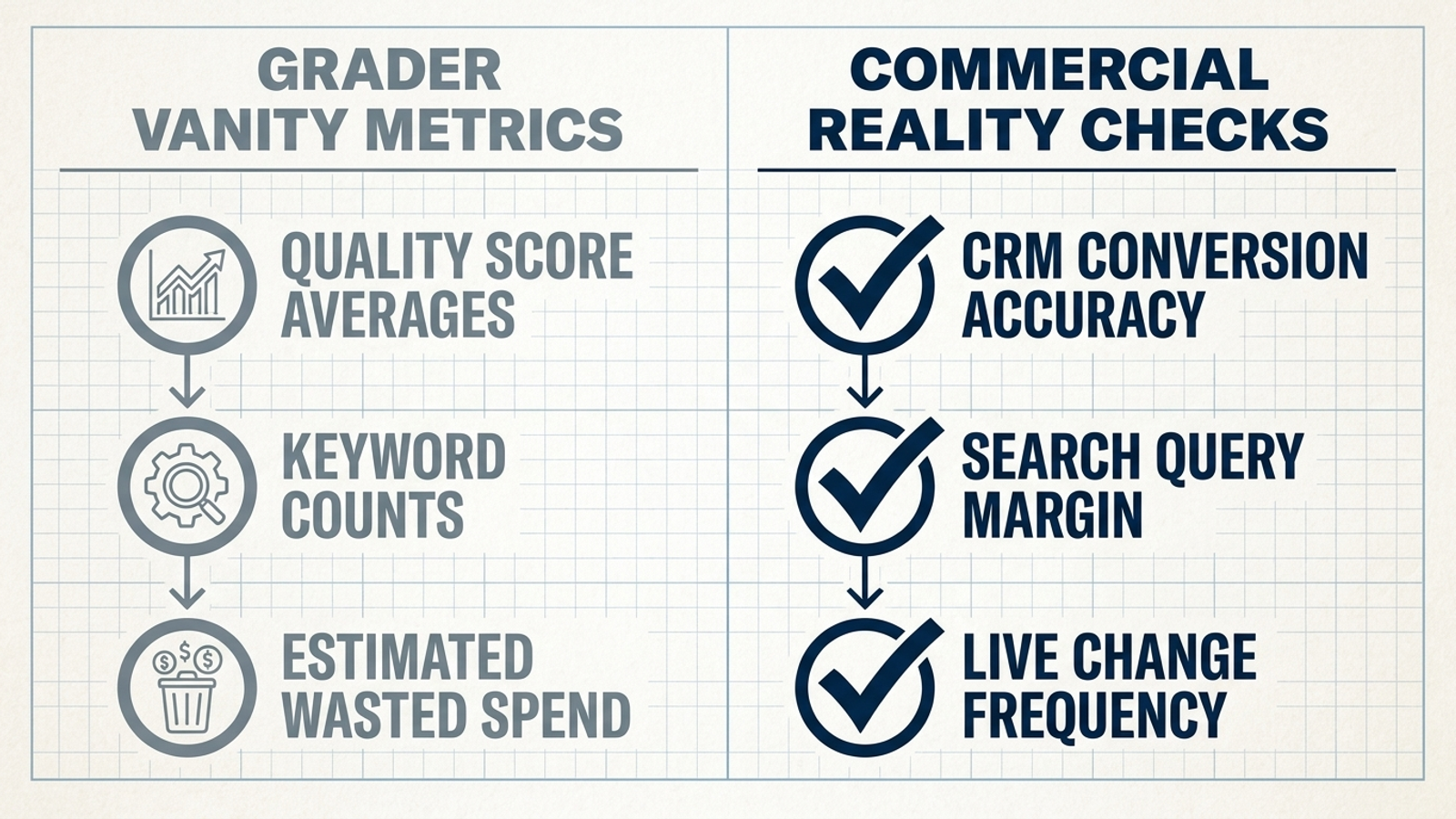
The 61 is ready to send; the account review is not. Before anyone recommends a rebuild, these are the commercial checks that separate a diagnostic from a settings scan. Our full Google Ads account audit checklist goes wider. This is the short version for the items most likely to change what we tell the prospect:
- Match search queries to margin: A term with clicks and no immediate conversion is a question to investigate, not an amount to stamp “wasted.”
- Test the landing page and lead path: Check forms, redirects, and conversion tags after site changes; an intact ad does not prove an intact path.
- Compare bidding targets with unit economics: A target CPA or ROAS means little until someone checks it against the value and cost of an actual customer.
- Read the change history: Find out whether bids, negatives, and creative are being adjusted or merely discussed at the monthly meeting.
- Reconcile tracked conversions with backend records: If the platform counts duplicate tags, soft actions, or spam as customers, bidding can pursue the wrong result while the report praises its efficiency. This is the skipped check that can make every other recommendation expensive.
Approved closing script: sell the score, then sell the cure
When the prospect asks whether the account is healthy, return to the PDF. It offers a reassuringly tidy answer: 61/100, four highlighted deficiencies, one projected annual loss. A tidy answer is useful when the question is also tidy. This one is not. The advertiser wants to know whether spending another dollar will bring back more than it costs, and whether the next change will improve that equation. Our score does not contain either answer.
Avoid confusing this report with Google’s Optimization Score; they are different measures. They do, however, invite the same sales-room mistake: treating a platform-facing number as if it settled a commercial decision. Likewise, a grader score does not fix a campaign. Someone still has to check what counts as a conversion, establish an allowable acquisition cost, and decide which changes deserve budget.
If the prospect asks us to put an acquisition-cost or pipeline target in writing before paying, we may have a harder meeting. We cannot answer with an amber Quality Score row. We must talk about the economics, the limits of the data, and who will own the work after the presentation. A percentage-of-spend fee and a promise to review search terms once a week may not sound as persuasive once the question is framed that way.
This is where groas makes an inconvenient comparison for our pitch. Its autonomous growth engine executes bids, query routing, and campaign adjustments continuously within human guardrails, with commercial targets established before payment. Our PDF can point to settings quickly; it cannot do that ongoing work or take responsibility for its outcome. Keep the call focused on the 61 if possible. If the prospect moves to attributable revenue, the report has reached the end of its useful life.
You do not need a diagnostic score. You need an operating model that takes accountability for attributable revenue.